




 下载地址:
[:zap:点我下载最新版本](https://github.com/huiyadanli/RevokeMsgPatcher/releases/download/0.5/RevokeMsgPatcher.v0.5.zip)
[❓常见问题](https://github.com/huiyadanli/RevokeMsgPatcher/wiki#%E5%B8%B8%E8%A7%81%E9%97%AE%E9%A2%98)
最新版本支持如下(微信从 2.7.1.74 版本开始支持多开):
| 名称 | 支持最新版本 |
|-----|---------------------------------|
| 微信 | 测试版 2\.7\.1\.82、稳定版 2\.6\.8\.68 |
| QQ | 9\.1\.9\.26346、9\.1\.8\.26211 |
| TIM | 2\.3\.2\.21173 |
历史版本支持如下:
| 名称 | 支持历史版本 |
|-----|-------------------------------------------------------------------------------------------------------------------------------------------------|
| 微信 | 2\.6\.6\.28、2\.6\.7\.32、2\.6\.7\.40、2\.6\.7\.57、2\.6\.8\.37、2\.6\.8\.51、2\.6\.8\.52、2\.6\.8\.65、2\.7\.0\.65、2\.7\.0\.70、2\.7\.1\.43、2\.7\.1\.59、2\.7\.1\.65、2\.7\.1\.74 |
| QQ | 9\.1\.7\.25980 |
| TIM | |
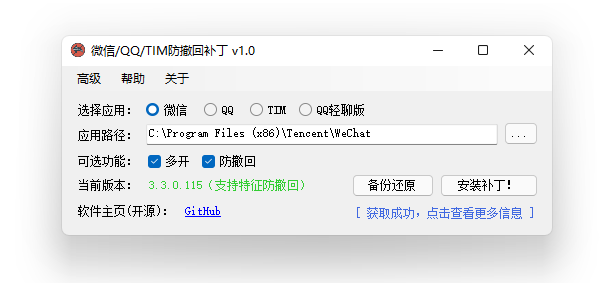
## :camera:截图
## 🔨使用方法
1. 环境要求,你的系统需要满足以下条件:
* Windows 7 或更高版本。
* [.NET Framework 4.5](https://www.microsoft.com/zh-cn/download/details.aspx?id=30653) 或更高版本。
2. 使用本程序前,先关闭微信/QQ/TIM。
3. **以管理员身份运行本程序**,等待右下角获取最新的补丁信息。
4. 选择微信/QQ/TIM的安装路径。如果你用的安装版的微信/QQ/TIM,正常情况下本程序会自动从注册表中获取安装路径,绿色版需要手动选择路径。
5. 点击防撤回。界面可能会出现一段时间的无响应,耐心等待即可。
## :heart:Thanks
[wechat_anti_revoke](https://github.com/36huo/wechat_anti_revoke)
## 📄License
GPLv3

下载地址:
[:zap:点我下载最新版本](https://github.com/huiyadanli/RevokeMsgPatcher/releases/download/0.5/RevokeMsgPatcher.v0.5.zip)
[❓常见问题](https://github.com/huiyadanli/RevokeMsgPatcher/wiki#%E5%B8%B8%E8%A7%81%E9%97%AE%E9%A2%98)
最新版本支持如下(微信从 2.7.1.74 版本开始支持多开):
| 名称 | 支持最新版本 |
|-----|---------------------------------|
| 微信 | 测试版 2\.7\.1\.82、稳定版 2\.6\.8\.68 |
| QQ | 9\.1\.9\.26346、9\.1\.8\.26211 |
| TIM | 2\.3\.2\.21173 |
历史版本支持如下:
| 名称 | 支持历史版本 |
|-----|-------------------------------------------------------------------------------------------------------------------------------------------------|
| 微信 | 2\.6\.6\.28、2\.6\.7\.32、2\.6\.7\.40、2\.6\.7\.57、2\.6\.8\.37、2\.6\.8\.51、2\.6\.8\.52、2\.6\.8\.65、2\.7\.0\.65、2\.7\.0\.70、2\.7\.1\.43、2\.7\.1\.59、2\.7\.1\.65、2\.7\.1\.74 |
| QQ | 9\.1\.7\.25980 |
| TIM | |
## :camera:截图

## 🔨使用方法
1. 环境要求,你的系统需要满足以下条件:
* Windows 7 或更高版本。
* [.NET Framework 4.5](https://www.microsoft.com/zh-cn/download/details.aspx?id=30653) 或更高版本。
2. 使用本程序前,先关闭微信/QQ/TIM。
3. **以管理员身份运行本程序**,等待右下角获取最新的补丁信息。
4. 选择微信/QQ/TIM的安装路径。如果你用的安装版的微信/QQ/TIM,正常情况下本程序会自动从注册表中获取安装路径,绿色版需要手动选择路径。
5. 点击防撤回。界面可能会出现一段时间的无响应,耐心等待即可。
## :heart:Thanks
[wechat_anti_revoke](https://github.com/36huo/wechat_anti_revoke)
## 📄License
GPLv3
